
How Chatsistant Powers a Smarter Chat Assistant to Human Support System
Build a support experience where AI handles the front line, humans step in only when needed, and your team can support live conversations, routed escalations, or ticket-triggered workflows without forcing everything into a rigid one-size-fits-all support stack.
Why Chatsistant is the right AI brain for this system
A lot of platforms are strong at tickets, queues, or internal collaboration. Fewer are built to be the intelligent conversation layer in front of all of that. Chatsistant is designed to be the AI brain: answering questions in real time, using trained sources, orchestrating workflows, collecting context, deciding when to escalate, and then connecting that handoff into the exact systems your team already uses.
It thinks before it routes
Instead of dumping every message into a human queue, Chatsistant can resolve more conversations automatically, collect structured details, and only escalate when human accountability, nuance, or urgency is truly needed.
It connects to your real stack
Use Chatsistant with your website, CRM, help desk, automation platform, internal dashboards, and API workflows instead of rebuilding your whole support operation around a single tool.
It scales better than human-only support
Humans are expensive and availability is limited. AI can stay live 24/7, cover repetitive work, pre-qualify requests, and keep conversations moving while the human team focuses on high-value interactions.
Two ways Chatsistant can handle human support
The best setup depends on how much control you need, whether your team is comfortable using the native Inbox, and whether your support agents should work in Chatsistant directly or in an outside system.
Best for the simplest live chat takeover
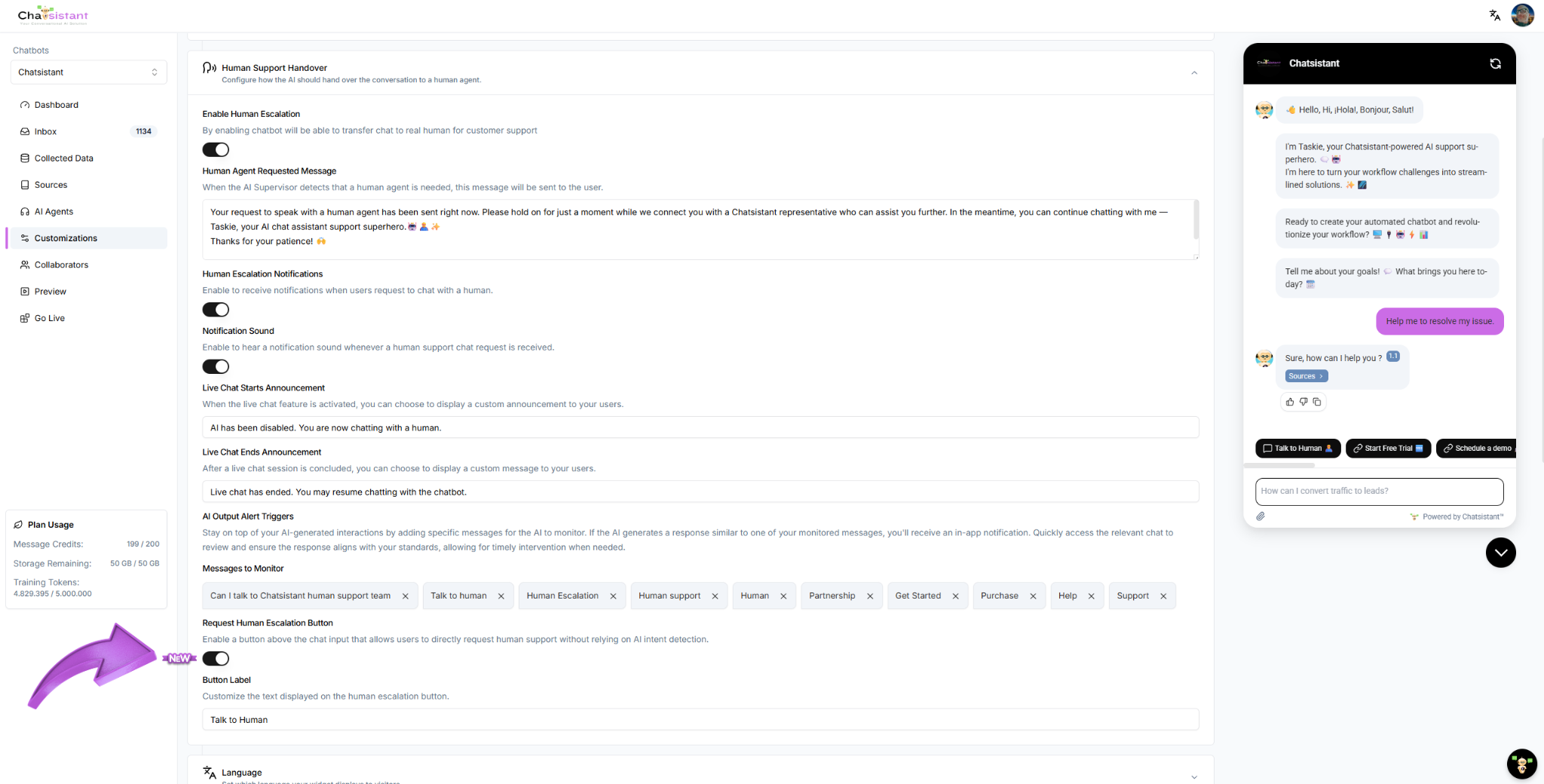
Chatsistant handles the chat, a user requests a human, and a collaborator takes over directly from the Chatsistant Inbox.
- Fastest path to live support
- AI can keep chatting while handover is pending
- AI pauses when the human sends the first native reply
- AI can resume after End Live Chat
Best for most businesses
Use Chatsistant for the actual live takeover, while also sending alerts to Slack, Teams, email, CRM, or other tools so the team sees escalations instantly.
- Best balance of simplicity and scalability
- Great for internal teams
- Adds awareness without losing native reliability
- Keeps AI logic and human control clean
Best for strict permissions or advanced operations
Chatsistant stays as the AI front end, but human agents work from another app, ticket system, or custom internal workflow.
- Great for controlled environments
- Needs more orchestration
- Best for CRM/help desk-heavy teams
- May require custom state logic
How the handover trigger works
Chatsistant supports two common ways to trigger human support:
- AI intent detection — you define the words, phrases, or conditions that should signal a request for human help.
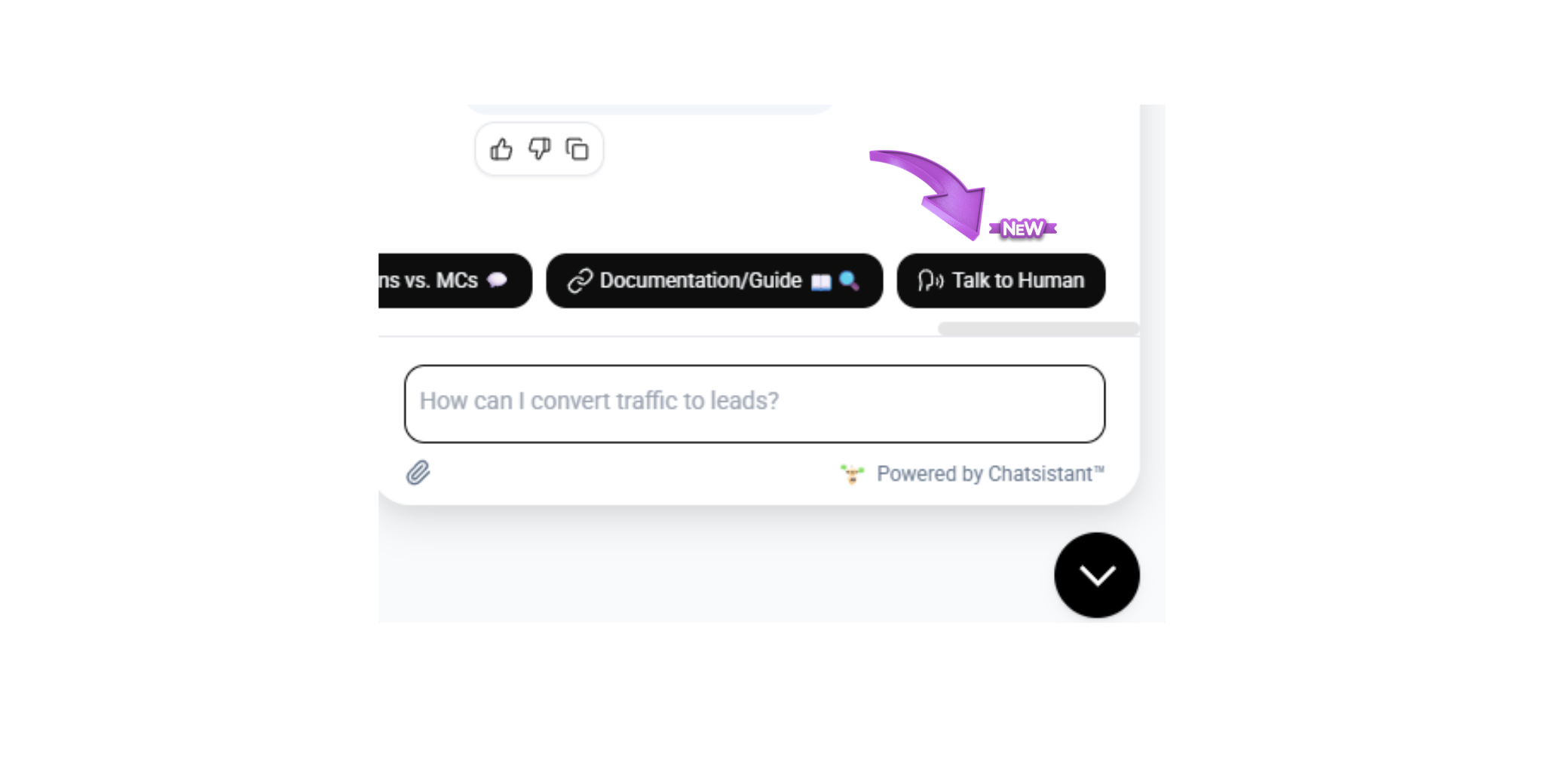
- Direct Talk to Human button — this bypasses intent detection and immediately triggers human notification.
The key benefit is that the AI does not have to go silent the moment escalation is requested. It can continue helping while human support is pending, then pause only when a human actually steps in.
How the native live handover works inside Chatsistant
This is the cleanest setup when your team is comfortable letting approved collaborators use the Chatsistant Inbox directly.
User asks for a human
The request can be detected by AI intent or triggered immediately by a Talk to Human button.
Notification is sent
Chatsistant can send browser notifications and optional sound alerts so the support team notices quickly.
Human enters from Inbox
The collaborator opens the session and replies from Chatsistant Inbox with their human profile and avatar.
AI pauses, then resumes later
Once the first human reply is sent natively, AI is disabled until the live chat is ended, after which AI can resume.
When should you go external instead?
If you do not want support agents to have native Inbox access, or if your company already operates heavily from a CRM, help desk, ticket system, or custom app, then external orchestration may be the better model.
Use native Chatsistant when
- You want the fastest deployment
- You want live human step-in without complex engineering
- Your internal team is trusted to use the Inbox
- You want the most reliable AI pause/resume behavior
Use external tools when
- You need stricter permissions
- You want agents to work from another support system
- You need queue ownership, case assignment, or deeper reporting
- You want to plug Chatsistant into a larger support ecosystem
Best tool options depending on your support model
Chatsistant can stay as the AI brain while other tools handle notifications, ticket ownership, or human coordination.
Fastest human awareness
Chatsistant Inbox notifications, Slack, Microsoft Teams, and Discord are great when the main goal is to alert a real person instantly.
Structured support operations
Zendesk, Freshdesk, Help Scout, Zoho Desk, and HubSpot Service Hub are strong when you need assignment, queueing, and lifecycle tracking.
CRM-heavy businesses
HubSpot, Zoho CRM, and other CRM-first workflows are ideal when support, sales, and client history need to stay in one connected place.
External human-only architecture: the exact logic you should use
If your human agents will work only in another system and not inside Chatsistant Inbox, then a webhook alone is not enough. You need state logic so AI knows when to keep helping and when to stop.
{
  "event": "human_support_handover",
  "session_id": "{{session_id}}",
  "conversation_id": "{{conversation_id}}",
  "chatbot_id": "{{chatbot_id}}",
  "channel": "{{channel}}",
  "user_name": "{{user_name}}",
  "user_email": "{{user_email}}",
  "last_user_message": "{{last_user_message}}",
  "chat_transcript": "{{chat_transcript}}",
  "priority": "normal",
  "assigned_team": "support",
  "escalation_reason": "User requested human support",
  "requested_at": "{{timestamp}}",
  "status": "pending_human"
}
if escalation_requested == true:
    notify_humans()
    escalation_pending = true

if human_active == false:
    allow_ai_to_continue()

if external_human_accepts_case == true:
    human_active = true
    pause_ai_responses()

if human_session_ended == true:
    human_active = false
    escalation_pending = false
    resume_ai_responses()
Copy-and-use integration examples
Below are sample payloads and starter snippets you can adapt for real-world builds. These examples are for demonstration and should be adjusted to your app, endpoint structure, and security practices.
const payload = {
  text: "🚨 Human support requested in Chatsistant",
  blocks: [
    {
      type: "section",
      text: {
        type: "mrkdwn",
        text:
          "*Human Escalation Requested*\n" +
          "*Session:* abc123\n" +
          "*User:* Jane Doe\n" +
          "*Email:* ja**@*****le.com\n" +
          "*Reason:* User requested a human\n" +
          "*Last message:* I need to speak to support now"
      }
    }
  ]
};

fetch("https://hooks.slack.com/services/REPLACE/WITH/YOUR/WEBHOOK", {
  method: "POST",
  headers: { "Content-Type": "application/json" },
  body: JSON.stringify(payload)
});
<?php
$raw = file_get_contents('php://input');
$data = json_decode($raw, true);

if (!empty($data['event']) && $data['event'] === 'human_support_handover') {
    $sessionId = $data['session_id'] ?? '';
    $userName = $data['user_name'] ?? 'Unknown';
    $userEmail = $data['user_email'] ?? 'Unknown';
    $lastMessage = $data['last_user_message'] ?? '';

    // Save to DB, create ticket, send email, or trigger another workflow
    error_log("Human escalation for session {$sessionId} from {$userName} ({$userEmail})");
}

http_response_code(200);
echo json_encode(['ok' => true]);
{
  "session_id": "abc123",
  "human_active": true,
  "agent_name": "Support Agent 1",
  "accepted_at": "2026-03-21T10:22:00Z",
  "channel": "support-team"
}
{
  "name": "route_human_escalation",
  "description": "Route the conversation to the correct team when human support is needed.",
  "parameters": {
    "type": "object",
    "properties": {
      "session_id": { "type": "string" },
      "department": { "type": "string" },
      "priority": { "type": "string" },
      "reason": { "type": "string" },
      "user_email": { "type": "string" }
    },
    "required": ["session_id", "department", "reason"]
  }
}
Recommended rollout path
The smartest way to launch this without overcomplicating it is to start simple and scale only when there is a real operational reason.
Launch native handoff
Get live support working fast using Chatsistant Inbox and human escalation settings.
Add awareness tools
Enable notification sound and browser alerts, then add Slack, Teams, or email for faster response visibility.
Add operational structure
When needed, create tickets, sync to CRM, and push escalation context into outside systems.
Go custom only if needed
Build external human-only flows and custom AI pause/resume orchestration only when permissions or workflow complexity truly require it.
Use Taskie for free help while you build
Taskie is our highly trained AI assistant and is available across our site and application to help you with build questions, workflows, configuration ideas, calendar bookings, and natural in-conversation support requests. You can even ask for human escalation directly through the experience.
What Taskie can help with
- Choosing the best handoff model
- Planning native vs external escalation workflows
- Source and training guidance
- Function-call and webhook ideas
- Booking time with our team from inside the conversation
How users can trigger human support
- Ask naturally in conversation
- Use the phrase patterns configured in Human Support Handover
- Click a Request Human or Talk to Human style button
- Escalate immediately when a button is configured to bypass AI intent matching
Helpful docs and next steps
These are the best places to start if you want to build, test, or extend a full AI-to-human support system with Chatsistant.
Documentation Introduction
Start here to understand how Chatsistant is structured and how its chatbot, agent, source, and orchestration model works.
API Key Setup
Generate your API key and prepare your account for API-based workflows, integrations, scripts, and external build logic.
Human Support Escalation
Learn how to configure native live handoff, notifications, avatars, and the actual step-in process for human support.
Launch the App
Open the app, build your chatbot, configure Human Support Handover, train your sources, and go live.
Build the support system you actually need — not the one a single tool forces on you
Chatsistant can act as the intelligent AI layer in front of your website, CRM, ticketing system, or human support operation. Start with a native live handoff, add alerts and routing where needed, and scale into deeper automation only when your business is ready.