The Agentic Ecosystem is Here
Model Context Protocol (MCP), OAuth, SDKs, webhooks, APIs, no-code automation, and modern LLM provider paths are converging. Chatsistant now brings those pieces together with a production Native MCP connector for ChatGPT, alongside its multi-agent framework, APIs, webhooks, variables, sources, and automation ecosystem.
1 · The End of the "Genius Intern" Era
For years, Large Language Models (LLMs) operated like genius interns locked in a windowless room. They could write code, reason through complex strategy, and draft beautiful copy perfectly. But the moment you asked them to actually do something, like pull a live document from Confluence, update a Salesforce CRM, or trigger a Stripe refund, they hit a wall.
Anthropic’s Model Context Protocol (MCP) changed the story by defining a universal, LLM-native “USB-C port” for data and actions. Take a look at the massive architectural shift:
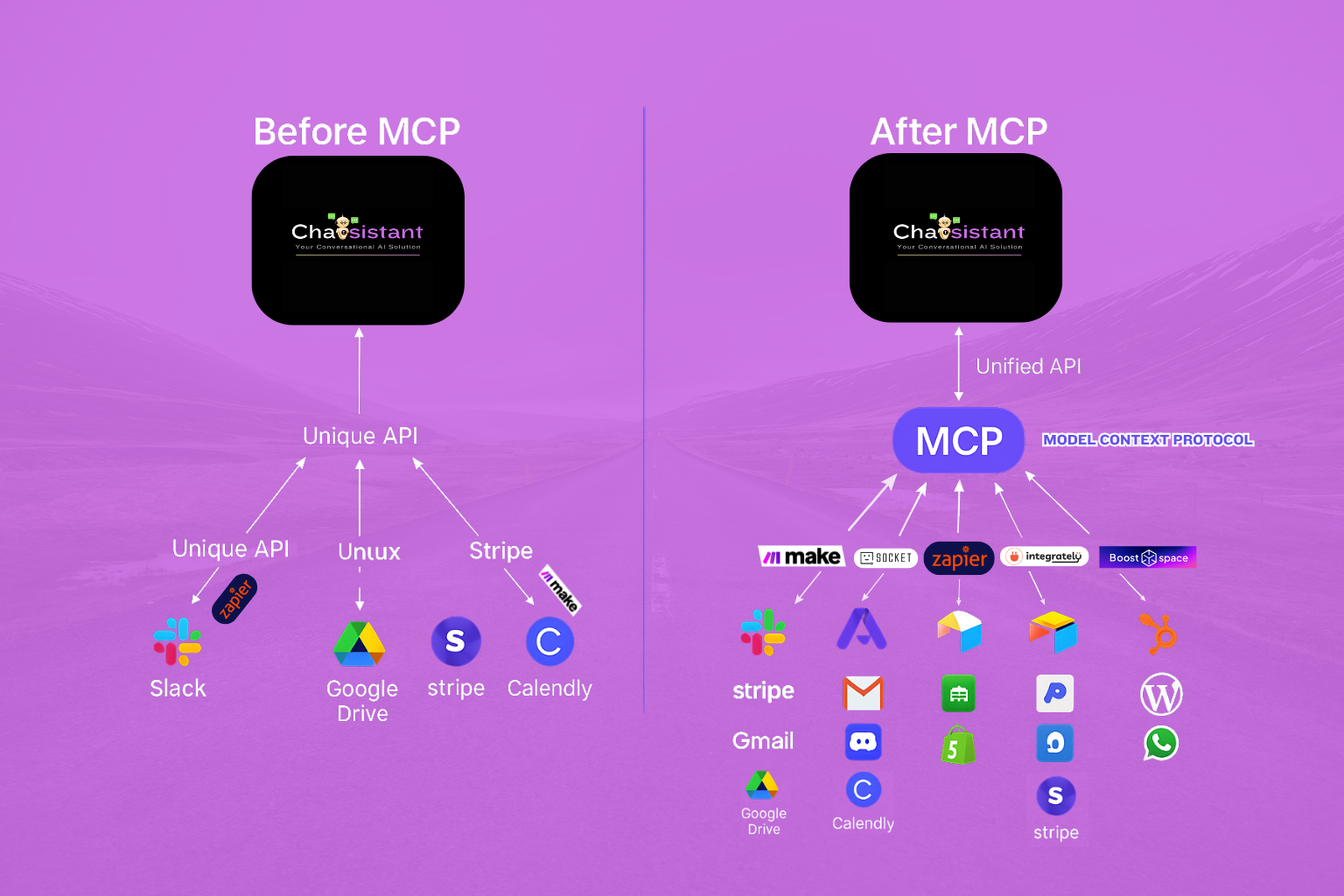
Before MCP (The M × N Nightmare): In software engineering, "M × N" means if you have M AI models or model providers and N data sources, you have to build a separate connection for every possible combination. As you add more models or tools, the workload multiplies quickly.
After MCP (The Chatsistant Way): It becomes closer to simple addition. You build one standardized tool or server path for a system. Then authorized AI clients, model families, agents, and workflows can securely access the same business data or actions without writing brittle glue code every time. Chatsistant has now taken that idea from architecture to a production Native MCP connector, with ChatGPT as the first proven client.
2 · MCP in Plain English
Technically, MCP builds on JSON-RPC 2.0. Conceptually, it gives AI hosts a standardized way to discover and use trusted capabilities. In Chatsistant, that now includes a production Native MCP path for authorized ChatGPT connections, while the broader framework continues to support model-provider paths such as OpenAI, Claude, Gemini, DeepSeek, Groq-powered options, and backend utility layers:
🛠️ Tools
Deterministic functions the model may call, such as search_code, send_email, or create_lead. Metadata includes the tool's name, description, and a strict inputSchema to help prevent AI hallucinations and keep outputs structured.
📄 Resources
Read-only content the host can securely inject into the AI's context, such as file://README.md, a customer knowledge base, or a live feed like sensor://line2/temperature, so agents can work from trusted data instead of guessing.
📑 Prompts
Reusable templates or workflow scripts that act as standardized guides for complex, multi-step reasoning, agent routing, automation handoffs, and business-specific execution flows.
⚡ LLM Ecosystem Update: Groq-powered options are now native inside Chatsistant, giving builders another high-speed inference path for agent routing, real-time support, intake workflows, automation, and multi-agent orchestration. Groq BYOK is supported through the Add AI API Key flow.
The 9 Concrete Benefits of This Standard
resources/subscribe can push live sensor data, Slack DMs, alerts, events, or operational updates into agent-aware workflows.3 · Chatsistant Native MCP: From Concept to Production
Chatsistant is no longer only explaining MCP as an emerging standard. The platform now has its own production Native MCP connector designed to let an authorized ChatGPT user work with Chatsistant data and supported actions through a governed tool layer.
The current submission represents a major product milestone: the connector is deployed, OAuth authentication works, refresh tokens work, the submitted tool surface contains 13 tools, and automated plus reviewer-focused validation has been completed. OpenAI has received the submission and the listing is currently in review.
Human Control Is Part of the Architecture
Connecting an AI assistant to business systems should not mean handing it unlimited authority. The Native MCP design separates discovery and reading from state-changing actions, keeps authorization scoped to the connected Chatsistant account, and supports explicit review paths for sensitive changes.
- Read before write: a user can inspect chatbot, agent, source, and conversation-related information before requesting a modification.
- Authorization boundaries: the connector operates only within the Chatsistant resources available to the authenticated account or collaborator.
- Negative-path testing: denied and cancelled change requests were explicitly tested so a rejected action does not silently execute.
- No credential dumping: OAuth is the public connection path, reducing the need to expose private API keys inside prompts.
What This Means in Practice
Instead of treating ChatGPT as a separate island, an authorized user can ask it to work with Chatsistant through defined tools. A typical pattern is read → review → act: inspect a specific chatbot, review its current agents or sources, then request an approved update. That keeps the conversational interface simple while the connector handles identity, authorization, tool discovery, and structured requests underneath.
This also matters strategically. Chatsistant can continue acting as the multi-agent and knowledge layer while ChatGPT becomes another controlled interface into that system. The same business logic can still connect outward through APIs, webhooks, Make, Zapier, Activepieces, Pipedream, and other automation paths.
Native MCP and viaSocket are different paths: Chatsistant Native MCP is Chatsistant's first-party connector submitted directly for OpenAI review. viaSocket remains a separate third-party MCP and automation bridge in the wider Chatsistant integration ecosystem.
4 · The Intelligence: Choose Your Brain
An agentic framework is only as smart as the models and provider paths powering it. Chatsistant supports a growing ecosystem of leading LLM providers so you are not locked into one model family. You can route specific tasks, agents, and workflows to the model path that best fits the job, whether you need speed, advanced reasoning, retrieval, automation, structured output, or cost-conscious scale.




🧠 Current model direction: Chatsistant public guidance now includes GPT-5.6-Sol, GPT-5.6-Terra, GPT-5.6-Luna, Claude Opus 5, Claude Sonnet 5, Gemini 3.6 Flash, Gemini 3.5 Flash-Lite, DeepSeek V4, and Groq-powered GPT OSS and Qwen paths.
🔑 BYOK is supported across provider paths where available: Users can connect supported provider keys through the Add AI API Key flow, including Groq for fast, low-latency AI workflows.
🚀 Still on the roadmap: OpenRouter remains under review as we continue testing maturity, feasibility, reliability, and demand for additional model routing possibilities.
Important note: Groq is a high-speed inference provider, not a single standalone LLM family. Current Groq-powered options in Chatsistant focus on GPT OSS 20B, GPT OSS 120B, and Qwen3.6 27B, depending on plan access, BYOK configuration, provider support, and account settings.
5 · The Core Engine: Webhooks, Variables & Native MCP
Intelligence needs infrastructure. Real multi-agent orchestration now spans four complementary paths inside the Chatsistant ecosystem: function calling, native webhooks, dynamic variables, and Native MCP. Together they let external applications and authorized AI clients talk to your agents while keeping business logic structured and controllable.
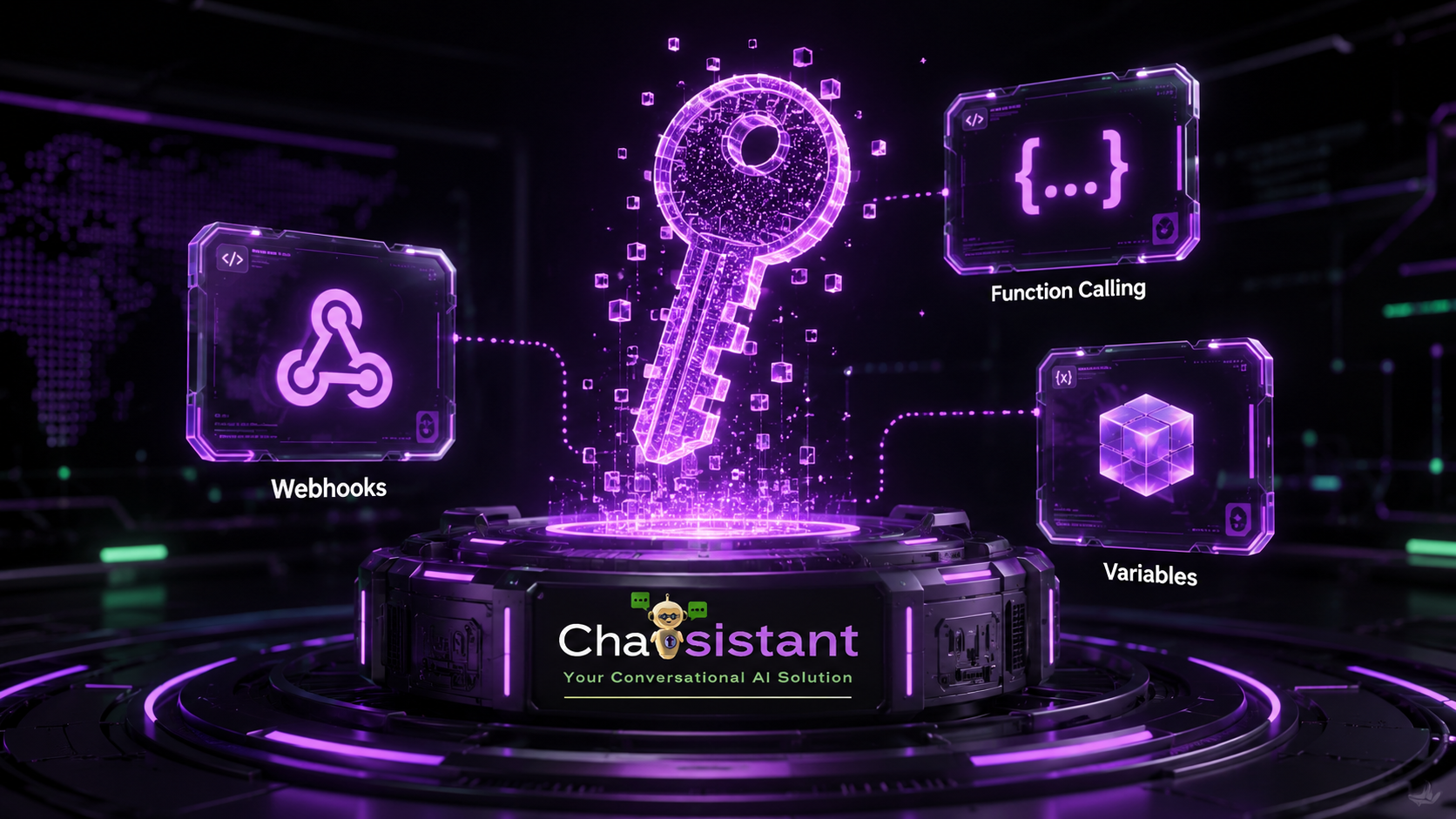
🛠️ Function Calling
Instead of hoping the AI guesses how to format a response, Agent Function-Calling Webhooks help force the LLM to output strict JSON schemas. This maps AI intent more cleanly to your business logic.
🔗 Native Webhooks
The nervous system of your business. Built-in webhooks act as open listeners and broadcasters, allowing external apps to wake up an agent, pass data into Chatsistant, or trigger an automation payload.
📦 Dynamic Variables
True orchestration requires memory. Pass useful, stateful data structures, such as a user's unique ID, past chat history, lead status, order status, or selected workflow, between multi-agent sequences.
🟣 Native MCP
A first-party, OAuth-authorized tool layer lets supported AI clients discover and use defined Chatsistant capabilities. ChatGPT is the first proven client and the current OpenAI submission is in review.
6 · The Automation Ecosystem
Chatsistant is the bridge between AI agents and real business systems. Whether you are a non-technical founder using no-code automation, a developer working with APIs, SDKs, webhooks, and CLIs, or a ChatGPT user connecting through Native MCP, Chatsistant can sit between the conversation and the systems that move your business. Say hello to Taskie, your digital workforce manager.


Plus Native MCP for authorized ChatGPT workflows, API, Webhooks, and developer-first compatibility with platforms like Pipedream. viaSocket remains a separate third-party MCP/automation bridge.
7 · MCP Versus Other Integration Schemes
MCP does not replace every other integration method. It complements them. Chatsistant now uses Native MCP alongside agents, sources, variables, function calling, webhooks, APIs, and automation tools so builders can choose the right connection pattern for each job.
OpenAI Function Calling
Fantastic for structured tool calls inside an AI application. MCP adds a standardized discovery and transport layer around tools. In practice, Chatsistant can use both: function calling inside agent workflows and Native MCP when an authorized external AI client such as ChatGPT needs governed access to Chatsistant capabilities.
Microsoft Semantic Kernel
Semantic Kernel orchestrates “skills” inside .NET and Python. MCP-style connectors can help centralize schema and authorization while allowing reusable tools to plug into broader agent workflows.
LangChain Tools
LangChain Tools are often in-process Python functions. With adapters, remote tool paths can be exposed as reusable tools, helping teams move from prototype logic toward more production-ready integrations.
8 · Real-World Orchestration & "Vibe Coding"
Welcome to the era of "Vibe Coding." You do not need to know every API detail to design powerful business logic. You describe the goal, define the tools, connect the systems, and let Chatsistant help route the right agent, model path, webhook, or automation for the job.
| Domain | Why Chatsistant + MCP Shines |
|---|---|
| A. Finance Ops Bot | An accounting tool exposes get_latest_invoice. A reasoning model reviews the invoice, a workflow agent routes it, and the correct person receives the document or approval request. |
| B. Developer Copilot | A GitHub tool exposes create_branch. Gemini plans the fix, DeepSeek supports technical logic, and a GPT or Claude agent drafts the final pull request summary. |
| C. Smart Factory | PLC Resources stream sensor://line3/vibration. Alert thresholds stream into a Chatsistant channel where a human manager can approve changes before action is taken. |
| D. Legal Summarizer | Google Drive lists new contracts. Prompts trigger "Summarize contract risks." Lawyers review the AI's notes, edits, and citations before final decisions are made. |
| E. Personal Automation | HomeAssistant-style tools wrap smart devices. A lightweight model maps a user request to an action, triggering tools like turn_on_light(room) or sending a confirmation back to the user. |
| F. Chatsistant Admin Copilot | An authorized ChatGPT user asks to inspect one Chatsistant chatbot, reviews its current agents or sources, then explicitly requests an approved update. Native MCP handles the structured tool call while Chatsistant enforces account access and the user remains in control of the action. |
9 · The API, Automation & MCP Setup Roadmap
Ready to build? Click on the images below to pop out and zoom in on the exact steps. Chatsistant now supports two complementary connection styles: traditional API/webhook automation and the new OAuth-based Native MCP path for approved AI clients. Security is paramount, so provider keys, API keys, OAuth grants, webhook endpoints, and automation flows should always be handled with care.
Connect Through Native MCP
For supported AI-client workflows, Chatsistant Native MCP uses an OAuth authorization flow rather than requiring users to paste a private Chatsistant API key into the conversation. As of October 14, 2026, the ChatGPT submission is still in OpenAI review and is not yet publicly published.
OAuth → Authorized Tools → Read / Review / Act
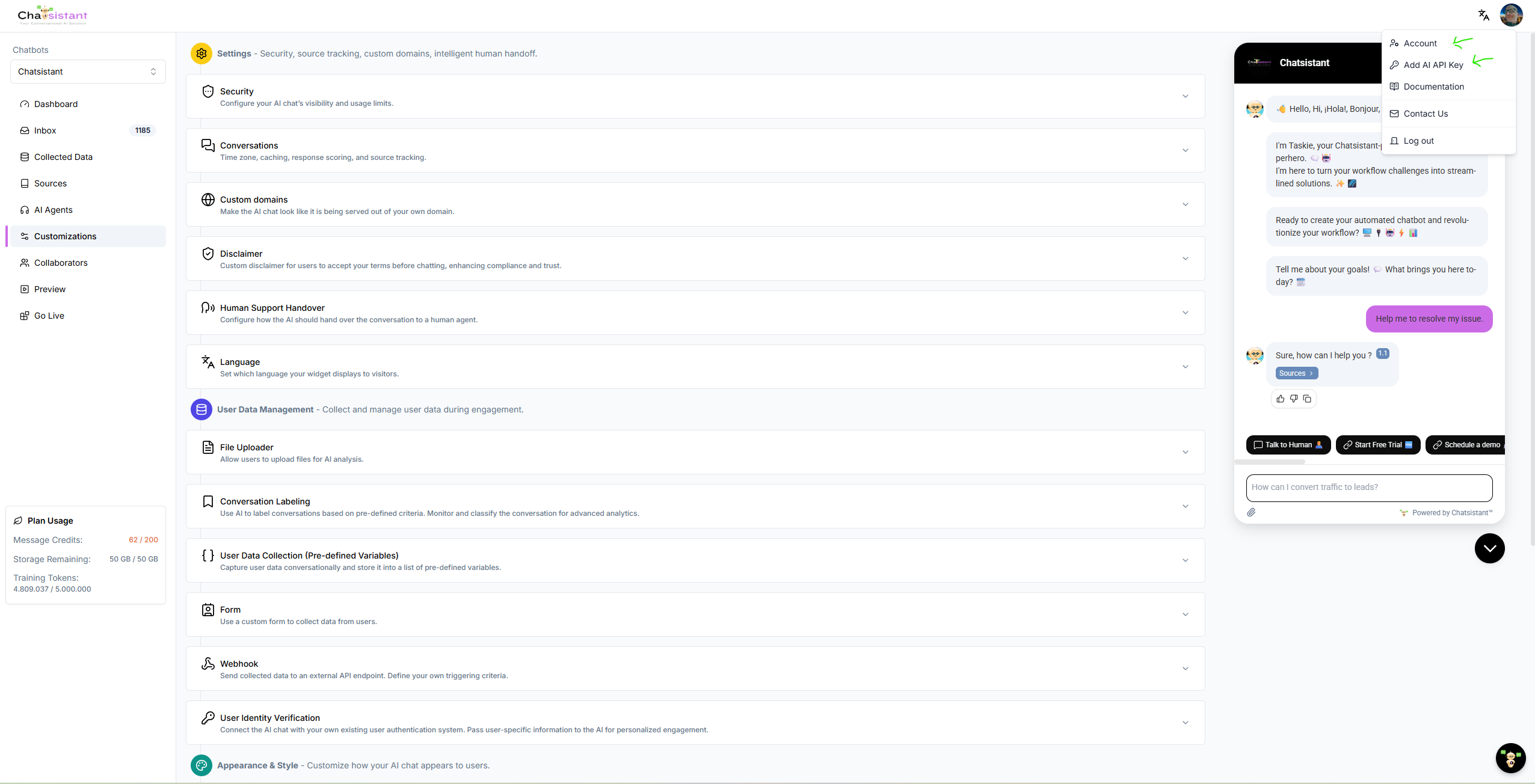
Access the Hub
Click your profile dropdown in the top-right corner and select Account. This is your mission control for provider keys, platform keys, and AI configuration.
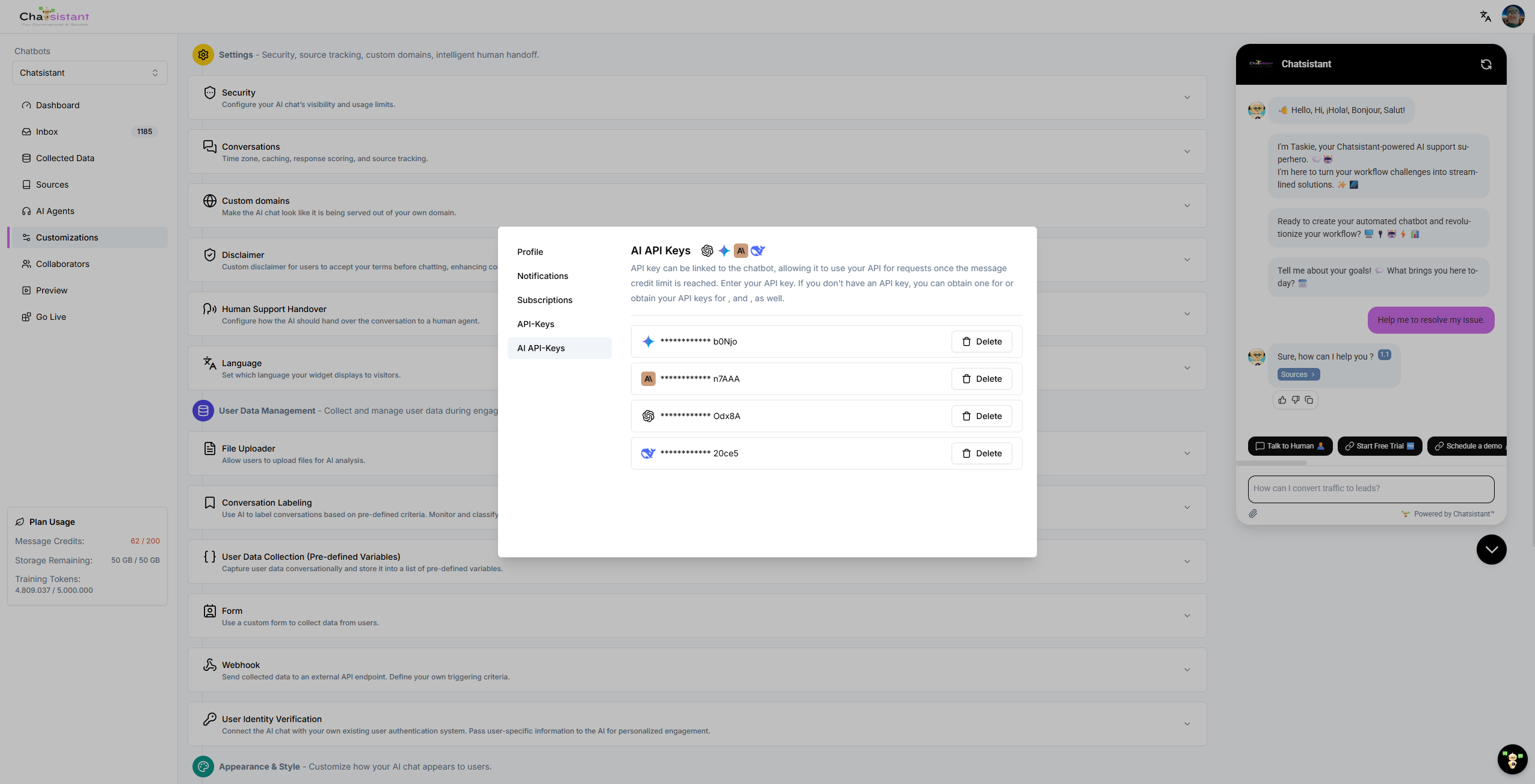
Activate the Brains
Under AI API Keys, plug in supported provider keys for OpenAI, Gemini, Claude, DeepSeek, or Groq where available. You choose the intelligence and provider path for your agents.
The Automation Bridge
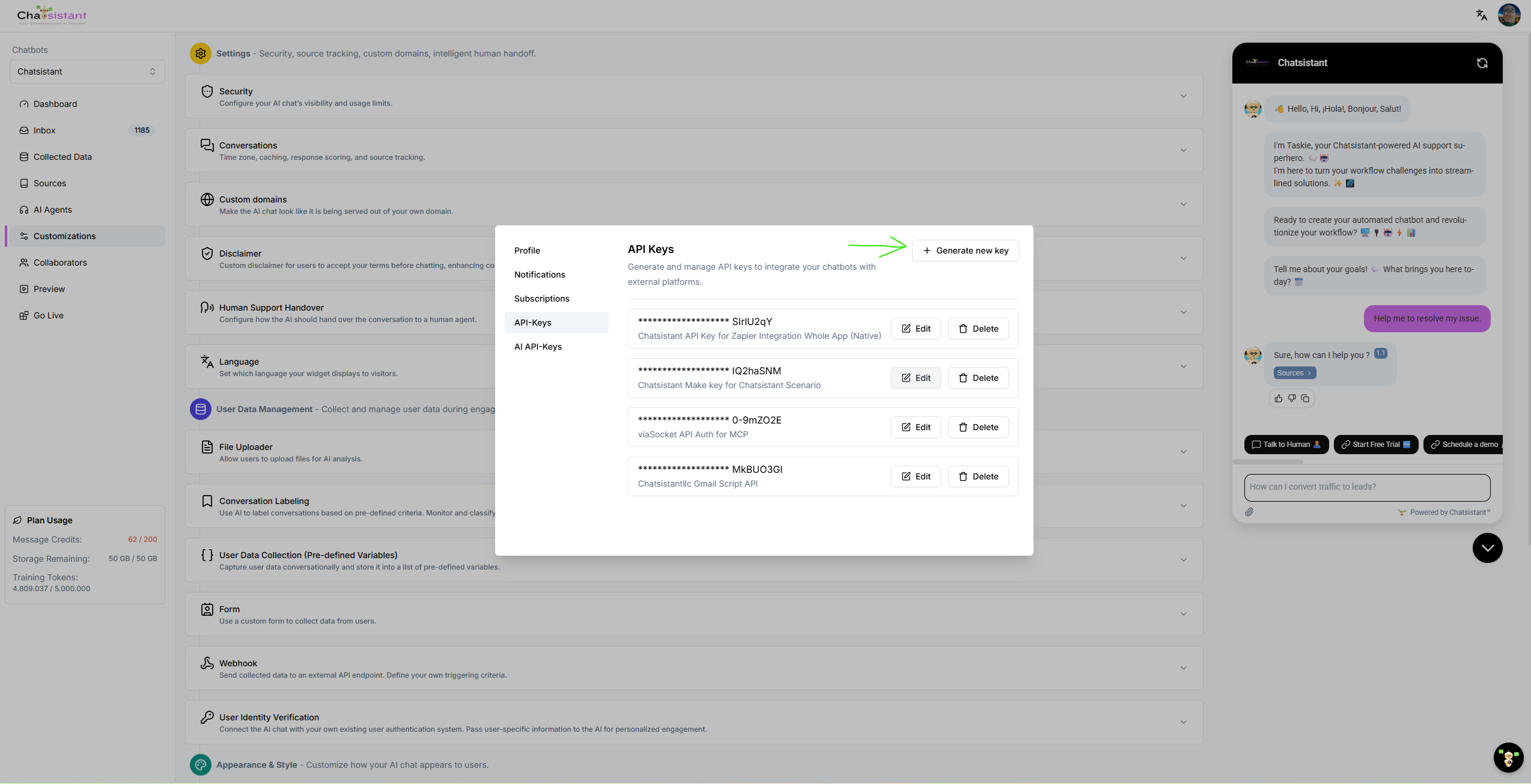
Navigate to the standard API Keys section. These keys are how platforms like Make, Zapier, viaSocket, Activepieces, Pipedream, Boost.space, or custom apps can authenticate inward to command your Chatsistant agents.
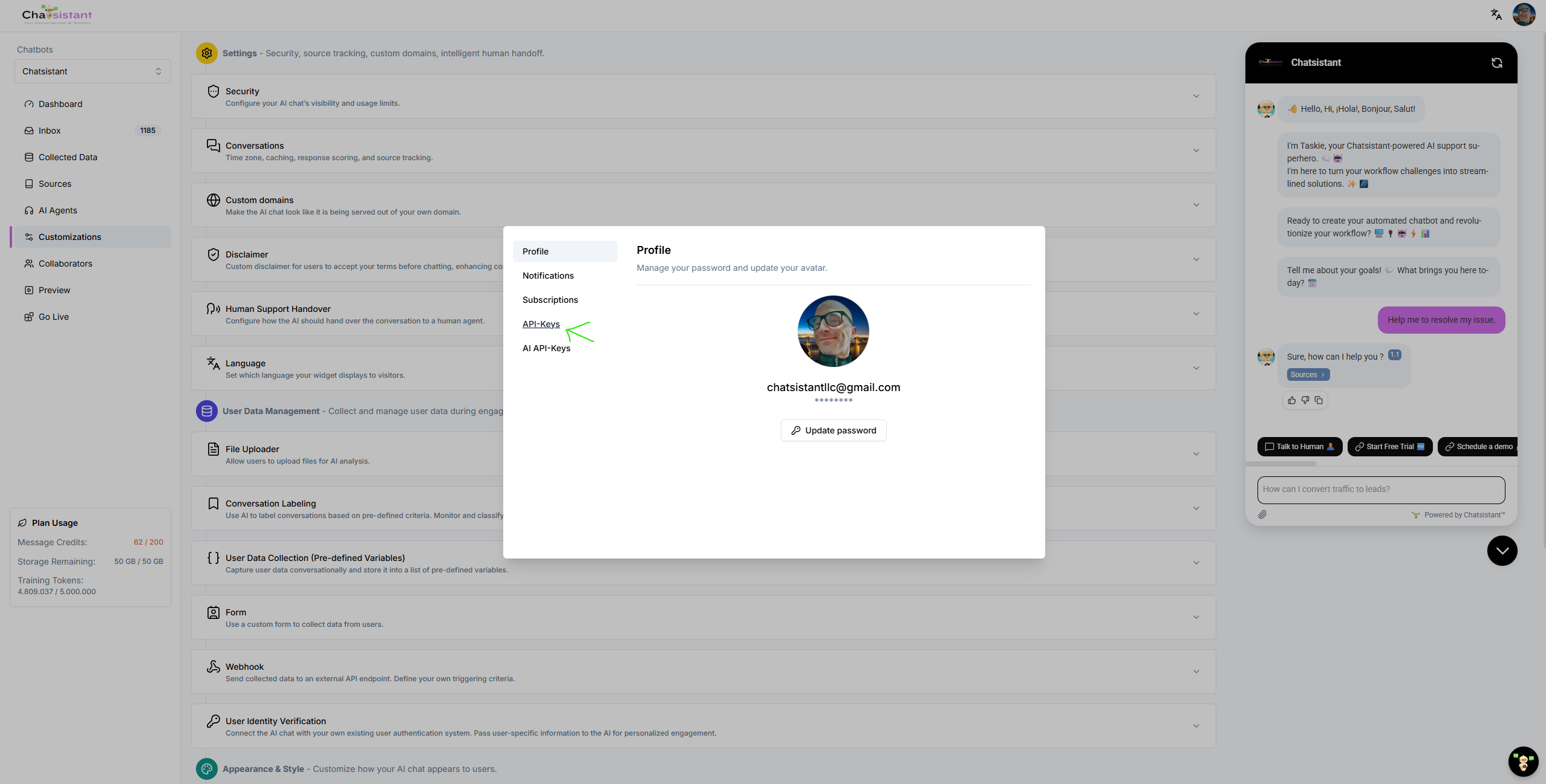
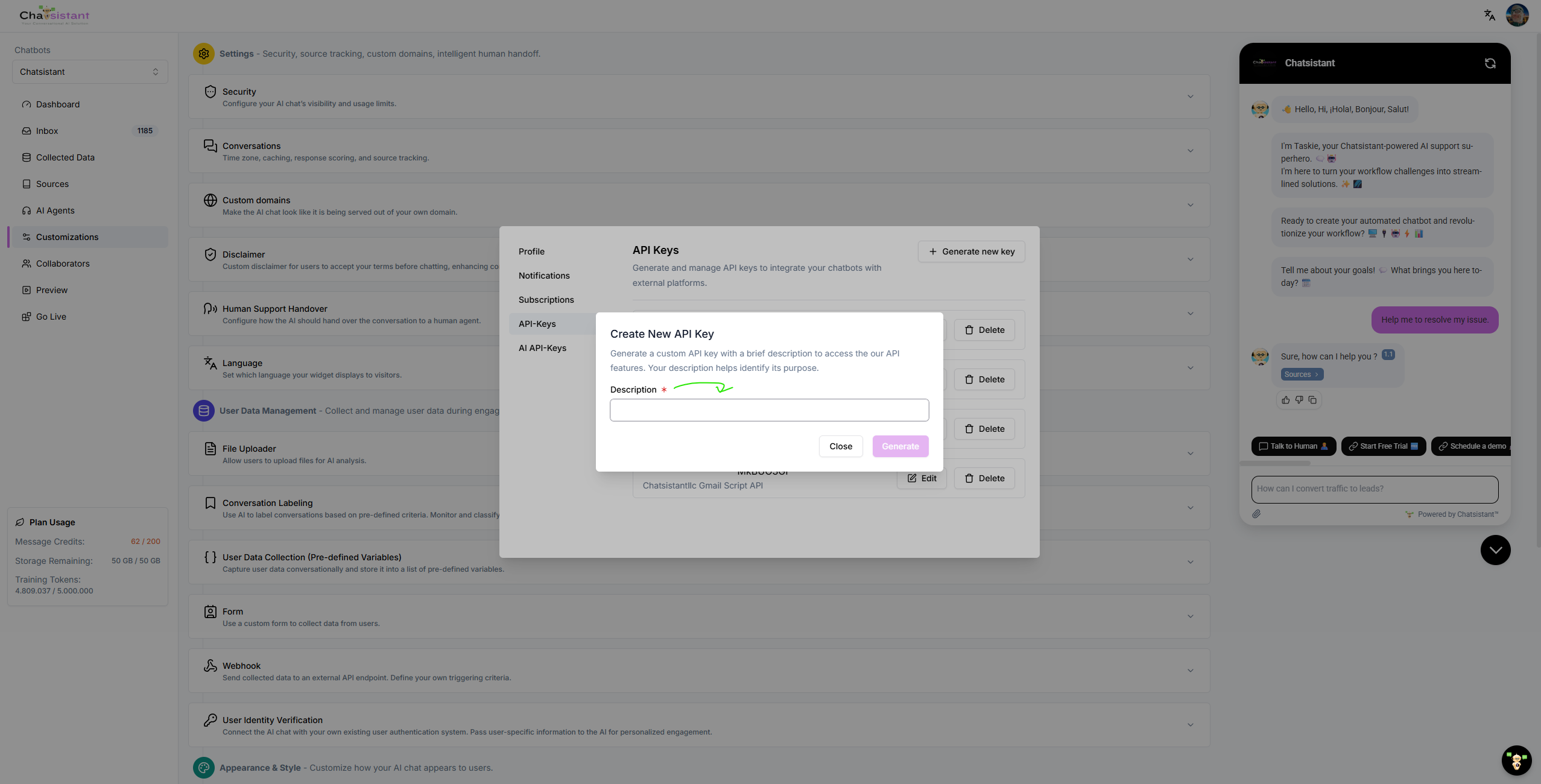
Generate & Track
Click Generate new key and give it a strict description, such as "Activepieces CRM Sync" or "Make Booking Flow." This makes it easier to track which external tool is using each API key.
10 · Appendix: The Developer's Deep Dive
If you are a techie looking to bypass visual builders and code your own server, Chatsistant accepts structured API and webhook payloads that can work alongside MCP tools, JSON-RPC patterns, OAuth-authorized clients, and automation platforms. Chatsistant's production Native MCP connector is first-party and separate from this simplified custom-server example. Here is a basic Python illustration using fastmcp.
# FastMCP Python Example for Chatsistant-Style Tool Integration
pip install fastmcp

from fastmcp import FastMCP

srv = FastMCP(server_name="Enterprise Billing Server")

# Define a Tool that the LLM can call
@srv.tool()
def get_daily_revenue(date: str) -> dict:
    """Return daily revenue from the database."""
    return db.query("SELECT sum(revenue) FROM sales WHERE date = ?", date)

# Expose a Resource the LLM can read
@srv.resource("policy://refunds/latest")
def read_refund_policy() -> str:
    return open("/docs/refund_policy.md").read()

if __name__ == "__main__":
    # Launch the server to listen for connected AI workflows
    srv.serve_http(port=5001)
Security & Performance Checklist
- Security Hardening: Use least-privilege API keys, rotate exposed keys, and keep provider secrets out of frontend code, screenshots, public repos, and client pages.
- OAuth for Public AI Clients: Prefer scoped OAuth authorization over asking end users to paste private Chatsistant API keys into conversational prompts.
- Read / Write Separation: Keep ordinary reads distinct from state-changing actions and make sensitive writes reviewable.
- Approval Gates: Require human review for sensitive actions like refunds, payments, legal changes, account updates, or destructive database actions.
- Live Streams: Use subscription-style events, webhooks, or polling where appropriate to push real-time updates into agent-aware workflows.
- Transports: HTTP, SSE, webhooks, and API calls can all serve different integration needs depending on the platform, firewall, and workflow design.
- Batched Calls: Group compatible tool calls where possible to reduce unnecessary round trips and improve workflow speed.